 Yesterday an important information has been posted by Kellie Stevens of Affiliate Fair Play in the 5StarAffiliatePrograms’ forum. Her alert is about a fairly newly created contextual adware that operates according to a model similar to Zango, Clicksor, or MediaTraffic. As an advertiser, you may buy traffic on DirectCPV.com which will be driven to you through their LoudMo adware. LoudMo also has a pay-per-install affiliate program (paying affiliates $1.25/install) to spread their downloadable software to Internet users. Once the adware is installed, it will display DirectCPV’s advertisers’ ads based on competitors’ URLs or relevant keywords, and do so right on the original website. LoudMo is different from Zango in the following:
Their adware has the ability to deliver interstitial ads. So the end user is browsing a site and suddenly they are shown a page to another site in the same browser window. …the page is loaded in frames, so the URL in the address box remains the same for the site that was previously being viewed by the end user. Even though the browser is titled LoudMo and there is a link to “skip” the ad …this can be confusing for some end users as to where the ad is really coming from. This also has implications with regards to the http referrer information.
The software also delivers inline ads. …sometimes these links look very similar to the legitimate links on the targeted web site, again potentially causing confusion for the end user. [more here]
Per Kellie Stevens, DirectCPV is now marketing their services especially aggressively. Watch out for them coming through/on the social media too (in forms of applications suitable for Facebook, etc):
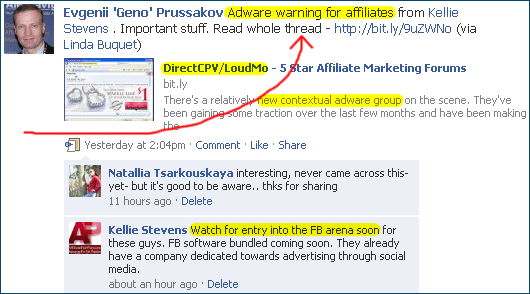
Both e-tailers and affiliates should be aware of LoudMo. The majority of affiliate networks (not to be confused with so-called “CPA networks”*) prohibit adware use, and justly so.
Read more in Kellie’s thread here.
____________________
* The CEO of DirectCPV is also a VP at RevenueGateway CPA network
Why do these loud mo ads come up on my computer. I have no interest in any of them and wish to block them. Can you be of help. I do not know of ever subscribing. Also I am Wired keeps popping up when I go to call up the Google search engine. Can you be of assistance in advising who it is and how it can take over like this? Is this a virus or something?
Kevin, they have removal instructions on their website at loudmo.com/networks/flvdirect (see point #2).
Let me know if this doesn’t work.
Geno,
No luck here. The program is not listed in installed programs. (I’ll try Windows remove utility next).
Interesting. Let me know what removes it (if anything).
Uninstall LoudMo Contextual Ad Assistant.
Find setupv.exe file in C/User/?/AppData/Local/Temp/SETUPV.EXE and delete this file, then it will be deleted Loudmo will be listed in installed programs.At least it worked on my PC. GL
Geno:
THANKS! These removal instructions worked under Vista. Any clue as to where this crap is coming from? I will make an effort not to visit any sites that use them.
Glad to hear it’s removable. It looks like you’ve installed it on your computer at some point, Robert (see my original post).
Thanks Geno and Big,
Seems to work under XP(SP3) as well…At least at my own PC it works just like you guys described.
On my girlfriends laptop however i can delete the setupv.exe file but loudmo does not show up on installed program list. Im not sure the problem is solved on her system but since she created the problem by installing “The Fall Trilogy” from isohunt…its just her problem now…Maybe if shes going to be really sweet ill look into it a little more.
Well seems to be still my problem…
The blank pop-up page with “advertise here” on the left and “skip this ad” seems to be gone. But the little pop-up in the center at the top keeps comming back when im on a commercial website…
Hi guys,
Geno asked me to pop by & respond to the removal questions.
I NEVER recommend anyone just start deleting files if they have an adware/spyware/malware problem that isn’t taken care of by the acceptable Remove Software through Control Panel. Doing so can result in mucking up essential operating files with some applications.
You should go to one of the many free support forums run by security guys to help you resolve your problem.
You can google “spyware removal forums” or “hijackthis forums” for many options. A few reputable places are also:
http://forums.majorgeeks.com/showthread.php?t=35407
http://forums.techguy.org/54-malware-removal-hijackthis-logs/
http://forums.malwarebytes.org/index.php?showforum=7
Be sure to read the Sticky Notes that lets you know the procedure for each individual forum before posting your issue (this will expediate resolving your issue).
Good luck and remember to be safe online!
Thank you for chiming in, Kellie. Much appreciated.
Finally i found a solution, at least with firefox:
“Try this:
First let’s get rid of the trojan.
Then go to C:Program FilesMozilla Firefoxextensions look into each folder and open the install.rdf with a text editor.
Look for the LoudMo Contextual Ad Assistant tag. If you don’t know the extension, delete the whole folder.
After that clear the cache and it should run fine again.”
http://support.mozilla.com/en-US/forum/1/520173?s=adware&as=q
I found the quick fix to stop the re-install of ldm1.exe and setupv.exe was to simply disable the startup app “esport2” via msconfig/startup.
Kevin– I was able to eliminate via disabling the LoudMo Contextual Ad Assistant plugin in FireFox.
I got this via running the FLVPlayer installer– no warning. Are they incorporated in the US? Class action, anyone?
Great tip from the guest… I didn’t have an add/remove programs entry, so finding the extensions folder with “loudmo” and IE add-on “zugo toolbar” did it for me
It doesn’t worked for me. I have tried all ideas but it comes again. I even blocked the website, Hijacked, uninstalled, but it opens again. It is more worrying in FireFox because it opens adult movies. Help needed here guys.
This is an absolute invasion of one’s privacy. Not only is it morally unsound, but it is criminal. It uses the trademarked names of the website YOU were viewing in many of the advertisements it displays. Granted, they didn’t create the advertisement content but they created, lease, and manage the proprietary distribution platform through which they are being displayed. Class action should certainly be considered.
Thank you so much for this! I’m hugely relieved to know that at least the problems weren’t due to a virus.
In my case, I know exactly where it came from: I downloaded the Babelfish programme available at Babelfish.com (having confused it with the one available on-line at Yahoo, which was the one I actually wanted), and this little nugget of joy came with it. At least that meant I could uninstall it easily as there was an ‘uninstall’ option on the control panel. I’ve done so, and, so far, everything seems OK. Is there anywhere where I can/should post a warning about downloading Babelfish?
I got this crap from my cousin. He downloaded some crappy program… Now I have BING as my homepage and I get redirected to crappy ad pages… My internet freezes. This is so f&%$ annoying…
I found the Loud MO Contextual Ad aware and the Search Toolbar (BING TOOLBAR) I uninstalled both of them. But they f%&(# installed themselves back…
Thanks for the heads up. Loudmo has been pissing me off for some time now, and now thanks to this thread I have got rid of it
Yeah, the program keeps re installing themselves in my case. Any help? I used to uninstall them from add/remove program. Well, it worked for 12 hours… and then, they popped up again installing themselves
I’m generally pretty careful when it comes to defending myself against these sorts of things. I can’t even remember the last time I had adware/malware of any sort much less something as annoying as this Loudmo thing.
It took me several hours of aggravation, but I think I’ve finally managed to completely get rid of it. Here’s my recommendation:
– Look under Program FilesMozilla Firefoxextensions and delete any folder that contains any mention of loudmo.
– Go to your Users[Your Username]AppDataLocalTemp and delete everything in there (most notably ldm1.exe and setupv.exe).
– Go to Add/Remove programs and uninstall LoudMo Contextual Ad Assistant and Search Toolbar completely.
– Open both Firefox and IE and delete the newly added bing.zumo.com search engines. Also check the Add-ons menus in IE and Firefox and delete anything that references LoudMo.
– Download, Install, and Run both Spybot:Search and Destroy and MalwareBytes Anti-Malware and remove anything that they find in their scans.
– Download, Install, and Run CCleaner. Run the cleaner to clear all of your internet cache and the registry cleaner to remove any errors (there were several references to SearchToolbar in there that I suspect are from LoudMo).
– Check the Start>Programs>Startup folder and delete anything that you don’t recognize in there. I found a program called “kav7.0.1.325en.exe” that I believe is what was reinstalling this crap every time I thought I had gotten rid of it.
– Also go to Start>Run and run “msconfig”. Check the startup tab and again check that there is nothing you don’t recognize in there (specifically a file called “kav7.0.1.325en.exe”).
– Restart and hope for the best! Good luck to anyone unfortunate enough to snag this malware.
This crap should be illegal. I’m so sick and tired of it screwing with my computer. Just found it, and am removing it.
@Chase:
kav7.0.1.325en.exe originates from Kaspersky Anti Virus 7.0.1.325. If you run an original version of Kaspersky the file is harmless, of course. If you don’t… the only right thing to do is to remove it like you said.
Good catch, Guest. You don’t want to remove an anti virus, or any other important application, in the process. See also Kellie Stevens’ advice a few comments up.
Even though you uninstall babelfish, the Loudmo Contextual Ad Software is still on your computer. Babelfish is still listed under programs on the desktop, but the Loudmo software is the only software in the dropdown list for babelfish.
Sorry, just to clarify – it *was* Loudmo I uninstalled and not Babelfish. There was an option for uninstalling on the Startup menu – I think it was in the drop-down list for Babelfish on Programs, but I recall it was fairly easy to find, anyway, even for a computer idiot like me. The computer had some unnerving warning about how it might not work properly if I uninstalled Loudmo, but as far as I can see it’s working just fine since then.
I uninstalled loudmo from my computer but I still get the bing toolbar and every now and then it still redirects me. What other program can be doing this how do I get rid of this altogether
Under Win 7 I got rid of LoudMo by disabeling the browser helper object “EVERYFLV” and by deleting G1t-jZ_-FlmM-.dll. Here you can see a printout from “TOOLS / MANAGE ADD-ONS” in IE8 :
Name: everyflv
Publisher: Control name is not available
Type: Browser Helper Object
Version: Not available
File date:
Date last accessed: 28. marts 2010, 22:26
Class ID: {4E8DB59C-CB25-777B-0AF7-06551E3D61C0}
Use count: 209
Block count: 4
File: G1t-jZ_-FlmM-.dll
Folder: C:Windowssystem32
I have tried EVERYTHING in this thread, no files show up anywhere, malwarebytes and SUPERantispyware dont pick anything up but I’m still getting the damn ads!
Hi Everyone,
I’m here to provide some information about loudMo and also help anyone that needs any assistance in removing the LoudMo Contextual Ad Assistant.
Our software products are a 100% opt in, we don’t collect any information on the users. Everything is clearly laid out on our terms and conditions on each of installer screens.
We also offer a toll free number (866) 992-6734 where users can call and ask how to uninstall, a ticketing system http://www.loudmo.com/support/ and live chat with our support team.
You can also follow the LoudMo uninstall links bellow for all of our products:
http://www.loudmo.com/networks/flvdirect
http://www.loudmo.com/networks/babelfish
http://www.loudmo.com/networks/babelfish
Hope this information is helpful to all.
Rocco
^^^ Rocco,
That is pure, unmitigated wet horse middens. FLV software installs this **** without appropriate notice, and does not provide a clear, simple uninstall for this malware. Your ads are clearly tracked. I strongly suggest that either the company you represent reconsider it’s tactics, or that you reconsider your employment, before one or both of you find yourself in legal woes.
For everyone reading this, I suggest reporting LoudMo as malware to your security provider, until they get the message.
CCleaner will find it and uninstall (under Tools). Not sure if it is necessary for Facebook to use it.
I had the same nasty Adware stuff in my Firefox. Why?
A friend of mine seemed to have placed a nice video of him on his Facebook wall. I wanted to watch it. My Win XP complained about the installed FLV player version.
So I followed the instructions to update it, downloaded a FLVDirect.exe with 653 KB (669,512 Bytes) and installed it. No hints about the adware stuff.
The .exe certificate was given by http://www.usertrust.com, Salt Lake City. Hahaha.
Signature information:
Name: Design and Marketing DM S.A.
E-Mail: [email protected]
Thanks to the comments in this blog, I found a folder in my Firefox installation:
C:ProgrammeMozilla Firefoxextensions{}
Its install.rdf told me that it s from LoudMo. I deleted the whole folder. First I had to unlock it with Unlocker.exe because Firefox and Explorer had their hands on it and protected it from being deleted.
I did NOT find any “esport” strings in the whole Windows registry. But I found “loudmo” stuff in there:
HKLMSOFTWAREMicrosoftWindowsCurrentVersionUninstallrV2-_6
It says that the Uninstaller for it is placed at:
C:WINDOWSsystem32rV2-_6.exe 108 KB (111,596 Bytes)
This .exe has NO information about itself at all.
When you run it, it alerts:
“LoudMo Contextual Ad Assistant Uninstall”
“Are you sure you would like to uninstall the LoudMo Contextual Ad Assistant (please note that your computer may not run exactly the same as before)?”
“Yes | No”
I clicked Yes which showed a dialog from “Nullsoft Install System v2.45”. Here I was able to select the three offered components to uninstall:
[x] LoudMo Contextual Ad Assistant
[x] Remove Search
[x] Clear Home Page
When I clicked Uninstal, another alert informed me that it will close all Firefox windows when I press the alert’s OK button.
I did and everything was uninstalled, even the registry key.
Maybe my notes can help others to get rid of this cr*p, too.
PS: Don’t trust anything offered by strange Facebook pages. Now that Facebook has become this popular, there are tons of malware/adware pages out there which try to hack your Facebook stuff. Don’t even trust that your Facebook friends have hooked you in pictures or movies. Don’t trust.
LoudMo contextual adware had something to do with facebook page it had something to do with a download i installed something tom?, I found the unstaller not where you said but in appdata Local Low, in the vista search bar i typed in the date it has on it in the control panel programs and features wich was 4/4/2010 the software is still listed but removed successfully. I hope this helps someone!
Chameleon tom software was where i think i got the bogus software LoudMo contextual adware, it’s a browser plugin that messes with mozilla…
My PC was updated through microsoft and restarted now it seems to be so much faster so it was that chamelion Tom and the bing plugins causing all the problems…
Grrrrr…I got the same crap from downloading the FLV media player also. No warning that it was installing anything else. Any company who has to install their software in this manner is less than reputable.
I’ve downloaded several torrents in the last week and when trying to play they say they must be played using this FLV player. I just went and deleted every torrent that requires this as I realize they are…unknowing to the public, asking you to download FLV so you can get this advertising crap on your computer.
Finally, after several hours, got rid of the LoudMo, Search Assistant, Bing toolbar and all that after doing various google searches on “how to remove”.
This kind of crap makes me lose all faith in a company being a reputable one.
Why on earth would I get a message that it has to be played in the FLV player if it’s a avi or wmv file? Only because they’ve configured the original download to say this so you’ll download all this BS.
THANK YOU! you solved my problem. Installing the flv player tampered with both ads pages and search function in firefox. I hate LoudMo.
Ok, so i have had a problem with LoudMo for a long time now, I’ve tried everything that everyone has suggested (literally) and the only solution that has worked for me is one that i though of on my own.
simply go to Windows explorer or just “my Computer” and search for LoudMo in the search bar, once it finds all the junk in your computer with any affiliation to LoudMo select all of it, and delete all of it.
I havent had a problem yet.
Hi all.
I was able to successfully remove this from Firefox by going to tools > add ons, scrolling down and uninstalling Loud mo. Haven’t had any issues with it again. I also got it from FLVplayer update =/ Last month I got the ave.exe Trojan…from flv player update *facepalm*
Hi Thanks Am, I did what you said and Loudmo was no more! Many thanks
Hi.
I’ve tried everything suggested here, to get rid of LoudMo. But I have no success at it. Did like Am said, and finally found LoudMo (I use Firefox). But the only option I can use is “turn off”. Can anyone help me? How can I get the option “uninstall” activated? It’s there, I just can’t click on it……
– “computer newbie”
Hello, i have the same problem as everyone else. I have now tried all the things written so far, and hopefully this should help. I have looked throug addons and i found that sneaky loudmo sh*t. But i can only turn it off and i want to delete it compleately, any ideas?
Thnx for this thread and all the good tips.
Oh, and Rocco and his company can burn in hell
Thanks so much my parents were getting so upset about this because they know I caused it now I am 5 minutes loudmo sober.
I have three popups from Loudmo web page. I do not know how they got on my pc since I never visited the site. The three popups are from Loudmo web page. I have tried everything written from this page to get ride of the popups. Nothing has worked. I did contact my security provider and they have been working with me to find this junk but we have not been successful. The worse one of the three is flvdirect, it is porn ( I am lucky that I don’t have children at home). These popups just show up at any time. Just yesterday my security provider has been able to at least block the flvdirect from contacting their web page. I get a notice that Access is denied. I did do what Kenneth suggested and now at least one of the web pages is marked as Malware with my security comany. I hope it is the beginning of the end with this company. Hey Rocco I hope you choke on this.
LOL, what you all dont get is that LoudMO is the backend to one of the most hottly pushed CPV networks out there who offer discounts to sign up and pay blog gurus $$$ to host their link and has huge referral commissions. The company is Direct CPV.
So, you have some of the most experienced people in IM making sure you get that FLV or Babelfish DL.
Also, stop being so naive. NOTHING IS FREE!
If someone is giving you something (esp. a for profit business) they damn sure are going to make sure they re-coup and profit at least 3:1 if not 500:1. So, think about that the next time you click on anything. Its a friggin monitization system. Grow up!
Are consumers really that out of touch with how the game works ?
IMV
It’s funny, after my post in March, I removed the program from my computer.
Yesterday I found that it had self installed itself again, don’t know when.
So I’ve removed it yet again.
I never clicked on anything, I don’t sign up for things I don’t know, nor am interested in.
This is where the files for LoudMo are kept. According to Microsofts Security Essentials.
File C:Users______AppdataLocalMicrosoftTemporary Internet FilesContent.IE541DUZ2NFsetup[1].exe
File C:Users______AppdataLocalTempnslB195.tempDownloads2766474.ex_
File C:WindowsSystem32-Fn_yCwy.exe (This is the unistaller for LoadMo)
File C:WindowsSystem32j-ksvr.dll(Security Essentials doesn’t know if this file is a threat. But it installed with LoudMo and Bing)
But even with all hidden files and superhidden files working you still won’t be able to find them all.
In Temporary Internet Files I can’t find Content.IE5
In Temp I can’t find nslB195.temp
j-ksvr.dll uninstalled with Flv (It’s an Toolbar and Extentions for Flv. You will need to disable it in Internet Explorer_Tools_Manage Addons.)
For Super hidden file you’ll need to edit the registy. Go to
[HKEY_CURRENT_USERSoftwareMicrosoftWindows
CurrentVersionExplorerAdvanced]
“SuperHidden” = 1
Change SuperHidden from 0 to 1
You will need to reboot after changing this setting for it to work.
Had the same problem with my Vista. Used the uninstalls, but there was no LoudMo unistall.
Reinstalled Flv Player to try again. This time I have Flv, LOudMo, and Search bar in Programs and Features.
I hope this will help anybody else who has this problem in the futrue.
Did you read my posting? Didn’t you find the uninstaller?
gosh i’ve been having this problem for a really long time! i can’t seem to find the appdata nor the loudmo nor the firefox extensions part. what should i do!
I’ve tried everything and I can’t get rid of it. And my computer isn’t recognizing any of the C: commands I’ve been typing it. It says it doesn’t exist or its typed wrong. Granted I’m computer illiterate. I can’t even find LoudMo on my uninstall menu or under tools, or even when I search the whol computer for it. I was able to get rid of the bing crap but now I’m stuck with LoudMo. I don’t know what else to do.
I have found loud mouth and uninstalled it from my computers add/remove programs but when i do a scan it still comes up in the following area C:Documentsandsettingsowneryour-084914e489localsettingstemp~nsu.tmpau_.exe=> i’ve tried to find this file but it just comes up it may have moved to another location. I’m using bitdefender free scan but it won’t or can’t clean it my software doesn’t even find it when scanning. Any suggestions as to how i can get this stuff off my computer?
Malwarebytes ought to zapp all the buggers troubling your computer!
Hello, If anyone got this shit, AdAware removed it quickly. Point to Lavasoft ^^
I take it back, it wasnt removed….
I found it on my pc to and I don’t remember installing it. I looked in my Mozilla Firefox files and Internet Explorer and did not find any trace of LoudMo in it or in any of my program files. But its in my add/remove list and add-ons manager list. And when I tried to remove it, it side (Warning: If you uninstall this software, your Free Lifetime Membership to view premium content will be removed.) What is up with that? How did I signup for whatever they are selling? I removed the search toolbar with no problem. Next I’m going to tell my lil computer search dog to find where LoudMo is rooted so I know which program it came in on and get rid of it.
My lil computer search dog didn’t find any thing at all on my computer related to LoudMo. So why is it on my program list? >:l I even looked myself in all my files and could not find anything LoudMo. And what lifetime membership is it talking about? I’ll keep looking I really need the memory space.